
Directory Browser Middleware With ASP.NET Core
Enable and configure directory browsing for static files in ASP.NET Core with the directory browser middleware.
 Khalid Abuhakmeh
2 min read
Khalid Abuhakmeh
2 min read
Written in 2016. APIs and package versions may have moved on since, so check the code against the .NET version you're targeting.
1998 called, and it wants to let you know that directory browsing is still cool. ASP.NET Core may be the latest technology on the block, but it likes the “classics” just as much as you do. Skimming through the ASP.NET documentation under “Working with Static Files”, I noticed that ASP.NET Core comes with a DirectoryBrowserMiddleware component that lets you expose the contents of a FileProvider. Here is the example from the ASP.NET site.
public void Configure(IApplicationBuilder app, IHostingEnvironment env, ILoggerFactory loggerFactory){    app.UseStaticFiles(); // For the wwwroot folder
    app.UseStaticFiles(new StaticFileOptions()    {        FileProvider = new PhysicalFileProvider(            Path.Combine(Directory.GetCurrentDirectory(), @"wwwroot//images")),        RequestPath = new PathString("/MyImages")    });
    app.UseDirectoryBrowser(new DirectoryBrowserOptions()    {        FileProvider = new PhysicalFileProvider(            Path.Combine(Directory.GetCurrentDirectory(), @"wwwroot//images")),        RequestPath = new PathString("/MyImages")    });}
And here it is running on my local machine.
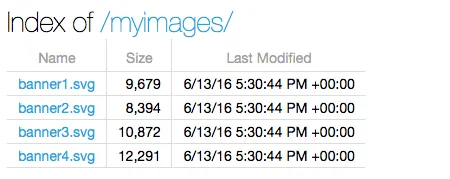
There are a few things worth noting with the DirectoryBrowserMiddleware:
- Both the
StaticFileMiddlewareand theDirectoryBrowserMiddlewaretake aFileProvider, which means the files don’t necessarily have to come from your local disk. They could as easily come from Azure Blob Storage or any otherFileProvider. - You specify the path that directory browsing happens. In this example, it is
/myimages. - You must specify that you can serve static files from the file system at the path of
/myimages, as well as serving fromwwwroot/images.
That’s really it, super simple and all with a little bit of nostalgia.
Around the web
Comments
Loading comments from GitHub Discussions…