
Getting Started With RethinkDB and ASP.NET 5
Load JSON data into RethinkDB, a JSON-focused database, and query it from an ASP.NET 5 application.
 Khalid Abuhakmeh
4 min read
Khalid Abuhakmeh
4 min read
Written in 2015. APIs and package versions may have moved on since, so check the code against the .NET version you're targeting.
I currently work in the healthcare industry and have found that the United States is a wealth of knowledge and data. Much of the data is freely available through web portals and comes in a JSON format. When consuming this data, I have two options:
- Process the JSON into my own proprietary format.
- Use the JSON as-is and leverage a technology that embraces the format.
When dealing with a small amount of data, the first option is enticing. When dealing with data at a national scale, the window on the first option begins to close and option 2 is a more reasonable approach. This post will show you how to load JSON into RethinkDB, a JSON focused database, and consume that data via ASP.NET 5. Note that RethinkDB is designed to work in a Unix environment.
Installing RethinkDB
I work on a MacBook Pro, so installing RethinkDB is as simple as running one command.
> brew install rethinkdbOnce installed, I just need to run the database. I also had to install python to utilize the import tool.
Importing The Data
Importing JSON data is very straight forward with RethinkDB. I just followed their great documentation. A sample of the data I need to import looks like this:
{ "drug_name": "DOXEPIN HCL CAP 10MG", "plans": [{ "drug_tier": "PREFERRED-GENERIC", "plan_id": "27248TX0010001", "plan_id_type": "HIOS-PLAN-ID", "prior_authorization": false, "quantity_limit": false, "step_therapy": false }, { "drug_tier": "PREFERRED-GENERIC", "plan_id": "27248TX0010002", "plan_id_type": "HIOS-PLAN-ID", "prior_authorization": false, "quantity_limit": false, "step_therapy": false }, { "drug_tier": "PREFERRED-GENERIC", "plan_id": "27248TX0010003", "plan_id_type": "HIOS-PLAN-ID", "prior_authorization": false, "quantity_limit": false, "step_therapy": false }, { "drug_tier": "PREFERRED-GENERIC", "plan_id": "27248TX0010004", "plan_id_type": "HIOS-PLAN-ID", "prior_authorization": false, "quantity_limit": false, "step_therapy": false }, { "drug_tier": "PREFERRED-GENERIC", "plan_id": "27248TX0010005", "plan_id_type": "HIOS-PLAN-ID", "prior_authorization": false, "quantity_limit": false, "step_therapy": false }], "rxnorm_id": "1000048"}Once I have my file downloaded, I execute the following command in my terminal.
rethinkdb import -f drugs.json --table lookup.drugsRunning a ReQL Query
To test that the data was loaded correctly, I just need to execute the ReQL query I would eventually like to run in ASP.NET 5.
r.db('lookup') .table('drugs') .filter(function (drug) { return drug("plans").filter(function(plan) { return plan("plan_id") === "27248TX0010001"; }); }) .map(function (drug) { return { name : drug("drug_name"), } })Executing this in the RethinkDB admin gives me the following results.
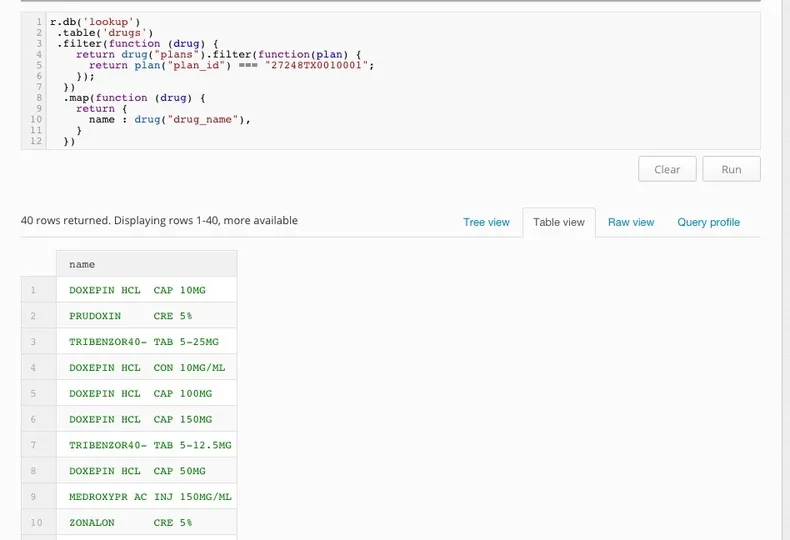
Now that I have my database full of data, and I have the query I’d like to execute, it is time to start writing some ASP.NET 5.
ASP.NET 5 Console Application
I highly recommend installing the Yeomon generator. I used the ASP.NET 5 console template as a starting point. After generating the project, I needed to install the RethinkDB.Driver library.
> dnu install RethinkDB.DriverNote: Be sure to have the aspvnext myget feeds added to your nuget.config.
Now we are ready to write our console application.
using System;using System.Collections.Generic;using System.Linq;using System.Threading.Tasks;using RethinkDb.Driver;using RethinkDb.Driver.Model;using RethinkDb.Driver.Net;
namespace HelloRethinkDb{    public class Drug    {        public string Name { get; set; }    }
    public class Program    {        public static RethinkDB r = RethinkDB.r;
        public void Main(string[] args)        {            // 27248TX0010001            string planId = string.Empty;
            while (true)            {                Console.WriteLine("Enter a Plan Id : ");                planId = Console.ReadLine();                Console.WriteLine();
                if (string.IsNullOrWhiteSpace(planId) ||                    planId.Equals("exit", StringComparison.OrdinalIgnoreCase))                {                    break;                }
                var connection = r                    .connection()                    .hostname("127.0.0.1")                    .port(RethinkDBConstants.DEFAULT_PORT)                    .timeout(60)                    .connect();
                Cursor<Drug> drugs =                r.db("lookup")                    .table("drugs")                    .filter(drug =>                    {                        return drug.bracket("plans").filter(plan =>                        {                            return plan.bracket("plan_id").eq(planId);                        });                    })                    .map(drug =>                        new MapObject()                        .with("Name", drug.getField("drug_name"))                    )                    .limit(10)                    .run<Drug>(connection);
                var result = drugs.ToList();
                foreach (var drug in result)                {                    Console.WriteLine(drug.Name);                }                Console.WriteLine(new string(Enumerable.Repeat('.', 50).ToArray()));                Console.WriteLine();            }        }    }}
The C# code looks almost identical to the ReQL in the previous section, although there are a few key points I’d like to mention:
- I have to create a
connection, which is implicitly created in the Administration tool but not in the C# application. - Instead of
[]the RethinkDB driver actually utilizes the wordbracket. - To map the results from JSON to our C# object, I need to utilize the
MapObjectclass. - I’m not exactly sure what a
Cursor<T>is and how it works, all I know is thatit implementsIEnumerable.
Running The Program
Once we have the program written, we need to build and run.
> dnu build> dnx run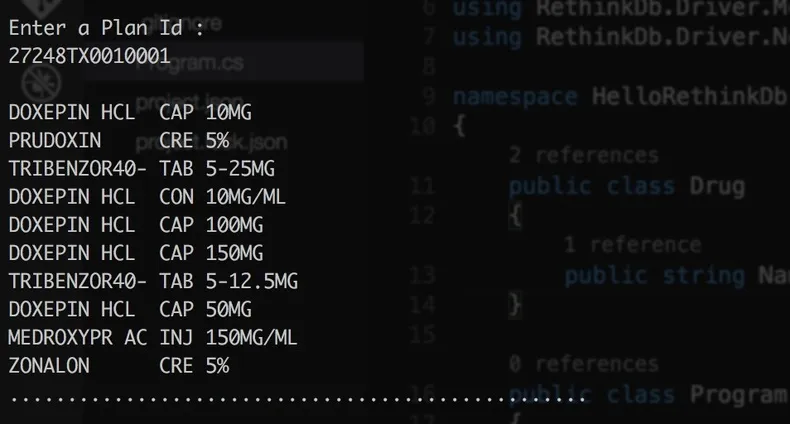
Yes! what’s better than seeing data? Maybe data fist pumping?

Conclusion
There you have it. We are utilizing ASP.NET 5, RethinkDB, and OSX to consume JSON data as easily as we possibly can. I am not a RethinkDB expert, but so far it has been a fun experience. My first try to write this post ended poorly as I was trying to use a RethinkDB library that relied too heavily on the data serialization inside .NET. If you have any questions or comments, please feel free to leave a comment or follow me on Mastodon @AquaBirdConsult.
Around the web
Comments
Loading comments from GitHub Discussions…