
Sql Database Per Git Branch
Automatically create a separate SQL LocalDB database for every Git branch to avoid Entity Framework migration conflicts.
 Khalid Abuhakmeh
4 min read
Khalid Abuhakmeh
4 min read
Written in 2014. APIs and package versions may have moved on since, so check the code against the .NET version you're targeting.
I’ve been getting back into Entity Framework, while also leveling up my Git skills thanks to Justin Rusbatch. We primarily use Entity Framework migrations and are running into a sizable inconveniences when working with database changes on different branches. Our common is that I may have several code first migrations on my branch, while another developer might have a few of their own. Each of us depending on one database to do our development while doing code reviews. This can be very frustrating, especially if you have seeded your database with branch specific data. I wondered to myself:
What if every time you created a new Git branch, you could have a SQL database automatically created for you?
I already had a great LocalDb implementation from a previous post, so I thought I would try to modify it. What I found was amazing. IT CAN BE DONE!, quite easily too. If you don’t believe me, look at the screenshots below.
Example Scenario
I am currently on the master branch, and as you can see, a new LocalDB database was created for me. I can utilize it with my code as I normally would any database. In my example, I am using NPoco.
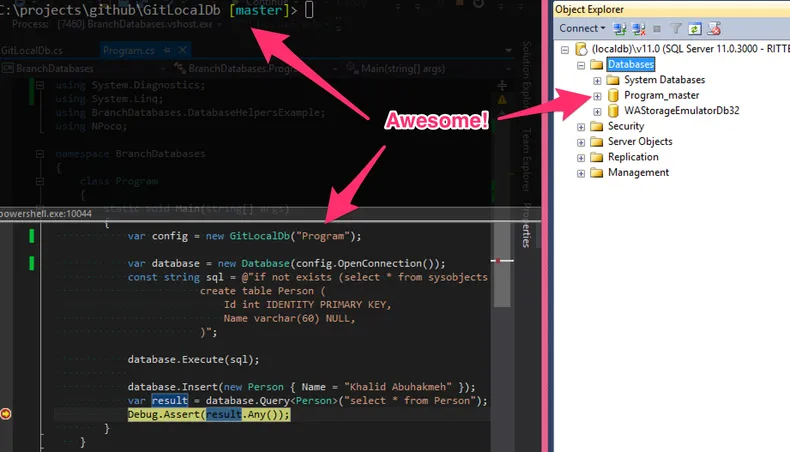
I then decided to switch to the another branch. I now have two databases, each uniquely isolated from the other.
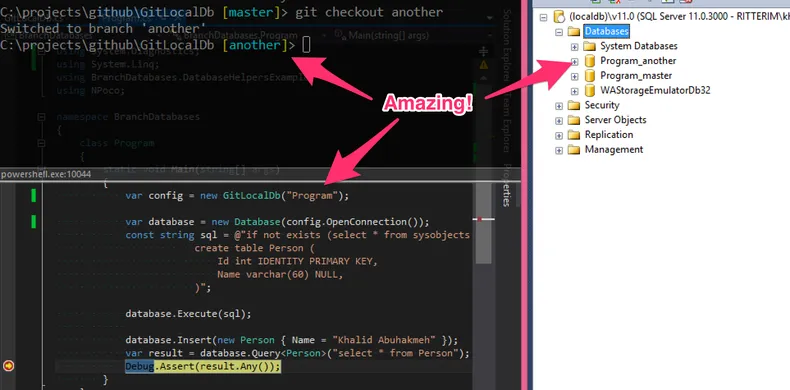
Woah! That’s pretty awesome if you ask me.
Code
If you want to try this out yourself, you can go to my GitHub repository, or just copy the file from below. There might be a few bugs to expunge, but I believe they are minor. Please try it and let me know what you think. I believe developers will either love it or think I have gone insane.
Note: If you use the code below, you will need to reference GitSharp from NuGet.
public class GitLocalDb{    private const string ExistsSql = "select 1 from sys.databases where name = '{0}'";    private const string MasterConnectionString = @"Data Source=(LocalDB)\v11.0;Initial Catalog=master;Integrated Security=True";    private readonly bool _forceNew;    public static string DatabaseDirectory = "Data";
    public string ConnectionStringName { get; private set; }    public string DatabaseName { get; private set; }    public string OutputFolder { get; private set; }    public string DatabaseMdfPath { get; private set; }    public string DatabaseLogPath { get; private set; }    public string BranchName { get; private set; }
    public GitLocalDb(string prefix, string outputPath = null, bool forceNew = false)    {        _forceNew = forceNew;        BranchName = new Repository(Directory.GetCurrentDirectory()).CurrentBranch.Name;        DatabaseName = string.Format("{0}_{1}", prefix, BranchName);        OutputFolder = Path.Combine(string.IsNullOrEmpty(outputPath)            ? Path.GetDirectoryName(Assembly.GetExecutingAssembly().Location)            : outputPath, DatabaseDirectory);        Initialize();    }
    public IDbConnection OpenConnection()    {        return new SqlConnection(ConnectionStringName);    }
    public void Destroy()    {        using (var connection = new SqlConnection(MasterConnectionString))        {            connection.Open();            DetachDatabase(connection);        }    }
    protected void Initialize()    {        var mdfFilename = string.Format("{0}.mdf", DatabaseName);        DatabaseMdfPath = Path.Combine(OutputFolder, mdfFilename);        DatabaseLogPath = Path.Combine(OutputFolder, String.Format("{0}_log.ldf", DatabaseName));
        // Create Data Directory If It Doesn't Already Exist.        if (!Directory.Exists(OutputFolder))        {            Directory.CreateDirectory(OutputFolder);        }
        // If the database does not already exist, create it.        using (var connection = new SqlConnection(MasterConnectionString))        {            connection.Open();
            if (_forceNew || !DatabaseExists(connection))            {                CreateNewDatabase(connection);            }            else            {                ConnectionStringName = string.Format(@"Data Source=(LocalDB)\v11.0;Initial Catalog={0};Integrated Security=True;", DatabaseName);            }        }    }
    protected void CreateNewDatabase(SqlConnection connection)    {        var cmd = connection.CreateCommand();        Destroy();        var sql = string.Format(@"if not exists(select * from sys.databases where name = '{0}') CREATE DATABASE {0} ON (NAME = N'{0}', FILENAME = '{1}')", DatabaseName, DatabaseMdfPath);
        cmd.CommandText = sql;        cmd.ExecuteNonQuery();        // Open newly created, or old database.        ConnectionStringName = String.Format(@"Data Source=(LocalDB)\v11.0;AttachDBFileName={1};Initial Catalog={0};Integrated Security=True;", DatabaseName, DatabaseMdfPath);    }
    protected bool DatabaseExists(SqlConnection connection)    {        using (var command = connection.CreateCommand())        {            command.CommandText = string.Format(ExistsSql, DatabaseName);            using (var reader = command.ExecuteReader())            {                return reader.HasRows;            }        }    }
    protected void DetachDatabase(SqlConnection connection)    {        try        {            var cmd = connection.CreateCommand();            cmd.CommandText = string.Format("ALTER DATABASE {0} SET SINGLE_USER WITH ROLLBACK IMMEDIATE; exec sp_detach_db '{0}'", DatabaseName);            cmd.ExecuteNonQuery();        }        catch { }        finally        {            if (File.Exists(DatabaseMdfPath)) File.Delete(DatabaseMdfPath);            if (File.Exists(DatabaseLogPath)) File.Delete(DatabaseLogPath);        }    }}
Have fun, and as always, I welcome your feedback.
Around the web
Comments
Loading comments from GitHub Discussions…