
Using Semantic UI with ASP.NET Core
Replace Bootstrap with Semantic UI in an ASP.NET Core application, from installing packages to updating layouts.
 Khalid Abuhakmeh
4 min read
Khalid Abuhakmeh
4 min read
Written in 2016. APIs and package versions may have moved on since, so check the code against the .NET version you're targeting.
The default template for an ASP.NET Core application comes with Bootstrap installed and ready to use. Bootstrap is great, and I recommend it as a solid base for any web application. That said, you may want to use a different UI framework, like Semantic UI. This post will walk you through the necessary steps to install and setup Semantic UI.
Step 1: Uninstall Bootstrap, Install Semantic UI
The standard ASP.NET Core template still uses Bower, so the first step is to use Bower to uninstall Bootstrap and install Semantic UI.
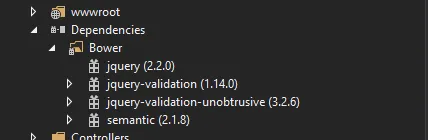
Step 2: Update ASP.NET Core Layout
The default template comes with a standard layout styled for Bootstrap. We need to change a few sections, mainly the references to stylesheets and JavaScript. Setting up the tag helpers is a bit more difficult, due to the fallback features of ASP.NET Core. I also decided to use CloudFlare’s CDN to retrieve a non-local version.
CSS changes
<head>    <meta charset="utf-8" />    <meta name="viewport" content="width=device-width, initial-scale=1.0" />    <title>@ViewData["Title"] - Application</title>
    <environment names="Development">        <link rel="stylesheet" href="~/lib/semantic/dist/semantic.css" />        <link rel="stylesheet" href="~/css/site.css" />    </environment>    <environment names="Staging,Production">        <link rel="stylesheet" href="https://cdnjs.cloudflare.com/ajax/libs/semantic-ui/2.2.2/semantic.min.css"              asp-fallback-href="~/lib/semantic/dist/semantic.min.css"              asp-fallback-test-class="transition" asp-fallback-test-property="animation-iteration-count" asp-fallback-test-value="1" />        <link rel="stylesheet" href="~/css/site.min.css" asp-append-version="true" />    </environment></head>
JavaScript changes
Next, at the bottom of the page, modify the Bootstrap references to point at Semantic UI.
<environment names="Development">    <script src="~/lib/jquery/dist/jquery.js"></script>    <script src="~/lib/semantic/dist/semantic.js"></script>    <script src="~/js/site.js" asp-append-version="true"></script></environment><environment names="Staging,Production">    <script src="https://ajax.aspnetcdn.com/ajax/jquery/jquery-2.2.0.min.js"            asp-fallback-src="~/lib/jquery/dist/jquery.min.js"            asp-fallback-test="window.jQuery">    </script>    <script src="https://cdnjs.cloudflare.com/ajax/libs/semantic-ui/2.2.2/semantic.min.js"            asp-fallback-src="~/lib/semantic/dist/js/semantic.min.js"            asp-fallback-test="window.jQuery && window.jQuery.fn && window.jQuery.site">
    </script>    <script src="~/js/site.min.js" asp-append-version="true"></script></environment>
Pick a Layout
If you go to the Semantic UI site, they have a few starter templates. Choose any one of the templates and update your Layout.cshtml file accordingly. Here is what I have.
<!DOCTYPE html><html><head>    <meta charset="utf-8" />    <meta name="viewport" content="width=device-width, initial-scale=1.0" />    <title>@ViewData["Title"] - Bank</title>
    <environment names="Development">        <link rel="stylesheet" href="~/lib/semantic/dist/semantic.css" />        <link rel="stylesheet" href="~/css/site.css" />    </environment>    <environment names="Staging,Production">        <link rel="stylesheet" href="https://cdnjs.cloudflare.com/ajax/libs/semantic-ui/2.2.2/semantic.min.css"              asp-fallback-href="~/lib/semantic/dist/semantic.min.css"              asp-fallback-test-class="transition" asp-fallback-test-property="animation-iteration-count" asp-fallback-test-value="1" />        <link rel="stylesheet" href="~/css/site.min.css" asp-append-version="true" />    </environment></head><body>
    <div class="ui fixed inverted menu">        <div class="ui container">            <a href="#" class="header item">                <img class="logo" src="http://semantic-ui.com/examples/assets/images/logo.png">                Bank            </a>            <a href="#" class="item">Home</a>            <div class="ui simple dropdown item">                Dropdown <i class="dropdown icon"></i>                <div class="menu">                    <a class="item" href="#">Link Item</a>                    <a class="item" href="#">Link Item</a>                    <div class="divider"></div>                    <div class="header">Header Item</div>                    <div class="item">                        <i class="dropdown icon"></i>                        Sub Menu                        <div class="menu">                            <a class="item" href="#">Link Item</a>                            <a class="item" href="#">Link Item</a>                        </div>                    </div>                    <a class="item" href="#">Link Item</a>                </div>            </div>        </div>    </div>
    <div class="ui main text container">        @RenderBody()    </div>
    <div class="ui inverted vertical footer segment">        <div class="ui center aligned container">            <div class="ui stackable inverted divided grid">                <div class="three wide column">                    <h4 class="ui inverted header">Group 1</h4>                    <div class="ui inverted link list">                        <a href="#" class="item">Link One</a>                        <a href="#" class="item">Link Two</a>                        <a href="#" class="item">Link Three</a>                        <a href="#" class="item">Link Four</a>                    </div>                </div>                <div class="three wide column">                    <h4 class="ui inverted header">Group 2</h4>                    <div class="ui inverted link list">                        <a href="#" class="item">Link One</a>                        <a href="#" class="item">Link Two</a>                        <a href="#" class="item">Link Three</a>                        <a href="#" class="item">Link Four</a>                    </div>                </div>                <div class="three wide column">                    <h4 class="ui inverted header">Group 3</h4>                    <div class="ui inverted link list">                        <a href="#" class="item">Link One</a>                        <a href="#" class="item">Link Two</a>                        <a href="#" class="item">Link Three</a>                        <a href="#" class="item">Link Four</a>                    </div>                </div>                <div class="seven wide column">                    <h4 class="ui inverted header">Footer Header</h4>                    <p>Extra space for a call to action inside the footer that could help re-engage users.</p>                </div>            </div>            <div class="ui inverted section divider"></div>            <div class="ui horizontal inverted small divided link list">                <a class="item" href="#">Site Map</a>                <a class="item" href="#">Contact Us</a>                <a class="item" href="#">Terms and Conditions</a>                <a class="item" href="#">Privacy Policy</a>            </div>        </div>    </div>
<environment names="Development">    <script src="~/lib/jquery/dist/jquery.js"></script>    <script src="~/lib/semantic/dist/semantic.js"></script>    <script src="~/js/site.js" asp-append-version="true"></script></environment><environment names="Staging,Production">    <script src="https://ajax.aspnetcdn.com/ajax/jquery/jquery-2.2.0.min.js"            asp-fallback-src="~/lib/jquery/dist/jquery.min.js"            asp-fallback-test="window.jQuery">    </script>    <script src="https://cdnjs.cloudflare.com/ajax/libs/semantic-ui/2.2.2/semantic.min.js"            asp-fallback-src="~/lib/semantic/dist/js/semantic.min.js"            asp-fallback-test="window.jQuery && window.jQuery.fn && window.jQuery.site">
    </script>    <script src="~/js/site.min.js" asp-append-version="true"></script></environment>
@RenderSection("scripts", required: false)</body></html>
Step 3: Modify Home#Index View
Put some content on your Home#Index view.
Step 4: Success!
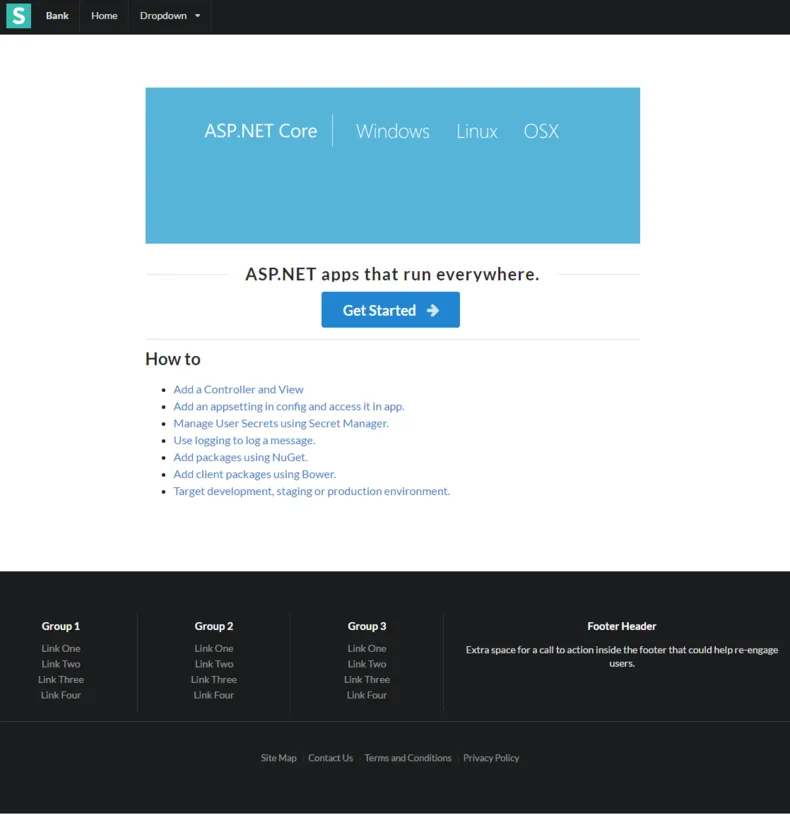
Run your ASP.NET Core application and you should now see your Semantic UI themed site.
Around the web
Comments
Loading comments from GitHub Discussions…