
Battling Spam in ASP.NET Core with the Akismet API
Use the Akismet API in ASP.NET Core to detect form and comment spam. Covers setup, endpoints, a Razor Pages example, and pricing FAQs.


You’ve spent the better part of a year building your site with hopes of positive community interaction. You deploy your application feeling you’ve accomplished something great. Days later, you realize that your community site has become flooded with horrible advertisements for the latest diet fads, get rich quick schemes, and links to the more sordid parts of the internet.
In this post, I’ll show you how to combat spam in your ASP.NET Core applications using the Akismet API and ideas for implementing necessary components you will need to keep your application data free of unwanted users and their content.
Akismet is a spam-detection API you call from ASP.NET Core to check user-submitted content before you save it.
Updated: November 2026 — code samples now use .NET minimal hosting (Program.cs) and the current Akismet NuGet package.
What Is Spam
No, we are not talking about any kind of canned meat. Spam is any unsolicited or undesirable message from a third party. As internet folks, we deal with unwanted email spam every day. You can also find spam in user groups, search engine results, blog comments, and text messages. If a communication medium exists, it likely has a spam problem. Why would anyone want to spam your application?
As stated on Wikipedia:
Spamming remains economically viable because advertisers have no operating costs beyond the management of their mailing lists, servers, infrastructures, IP ranges, and domain names, and it is difficult to hold senders accountable for their mass mailings. –Wikipedia
Fun fact: The term spam can be traced back to Monty Python’s Flying Circus.
What is the Akismet API?
Akismet is an API service provided by Wordpress. It is a database with known spam instances that can help identify comments as spam. The service works by crowd-sourcing identification to users of the API and comes bundled with every Wordpress instance.
Used by millions of websites, Akismet filters out hundreds of millions of spam comments from the Web every day. –Akismet
As of writing this post, Akismet claims to have blocked close to 500 million spam comments.
What are the Akismet API endpoints?
The Akismet API has four functional endpoints:
| Endpoint | Purpose |
|---|---|
| Key Verification | Clients can use this endpoint to verify API keys. Mainly used by services that allow users to add their keys to the application. |
| Comment Check | Clients can send comments (or any message) to Akismet for spam validation. The check endpoint is the most used endpoint on the service. |
| Submit Spam | This allows applications to submit verified spam to Akismet, thus enhancing the database of known spam. |
| Submit Ham | Allows clients to provide false positives (real comments marked as spam), giving Akismet an idea of what factors may have caused the mistake in the first place. |
I really recommend reading the Akismet documentation, as it gives detailed advice when testing your implementation.
Before Getting Started With Akismet
Before using Akismet in your application, you must take into account a few factors.
- Akismet is free for personal, non-commercial use, but commercial use requires a paid plan starting at about $5 a month. You can create a free account for local development.
- Akismet is not perfect. It relies on users to actively mark incoming messages as spam, and also mark false-positives as ham. Thus plan for building mechanisms in your application to manage any avenue protected by Akismet.
- Akismet is a web API, so performing any spam protection will incur a network request over the internet. If you have sensitive information or require an offline solution, this is not something I would recommend.
If all those caveats look reasonable to you, you can continue to the Akismet developer portal.
Before continuing to the implementation, you will need an API key from Akismet.
How do you use the Akismet API in ASP.NET Core?
Now that you understand what Akismet is, you can imagine how you may use it to increase the quality of user interaction in your application. The implementation is quite simple, given Akismet is a web API.
The first step is to install the Akismet client in your ASP.NET Core application. I use a library called Akismet from NuGet.
dotnet add package AkismetThe second step will involve us registering our AkismetClient with ASP.NET Core’s dependency injection in Program.cs. To initialize the client, you will need an API key, the URI of your application, and the name of your app.
using Akismet;
var builder = WebApplication.CreateBuilder(args);
builder.Services.AddRazorPages();
builder.Services.AddSingleton(    new AkismetClient(        builder.Configuration["Akismet:ApiKey"]!,        new Uri(builder.Configuration["blogUrl"]!),        "spam-killer"));
var app = builder.Build();
app.UseStaticFiles();app.UseRouting();app.MapRazorPages();
app.Run();
Keep your API key in user secrets or environment variables rather than hard-coding it. For a related look at forms and tokens, see my post on Blazor HTML forms and antiforgery tokens.
I chose to register the client as a singleton because the AkismetClient has an internal HttpClient and is otherwise stateless. Feel free to register the client for your specific needs. You may have to use a transient registration if you allow users to supply personal API keys.
The next step is to use it in our application. In this example, I am using Razor Pages with a simple form.
public class Contact(AkismetClient akismet, IConfiguration configuration) : PageModel{    [BindProperty]    public string? Comment { get; set; }
    [BindProperty]    public string? Author { get; set; }
    public bool? IsSpam { get; set; }
    public async Task OnPostAsync()    {        var comment = new AkismetComment        {            Blog = new Uri(configuration["blogUrl"]!),            CommentAuthorEmail = Author,            CommentContent = Comment,        };
        IsSpam = await akismet.IsSpam(comment);    }}
You can see, we are using the AkismetClient to call the IsSpam endpoint with an AkismetComment. A comment has the following properties:
public Uri Blog { get; set; }public string UserIp { get; set; }public string UserAgent { get; set; }public string Referrer { get; set; }public string Permalink { get; set; }public string CommentType { get; set; }public string CommentAuthor { get; set; }public string CommentAuthorEmail { get; set; }public string CommentAuthorUrl { get; set; }public string CommentContent { get; set; }You don’t have to set all the properties, but the more information you can provide Akismet, the more likely they are to flag an incoming comment as spam.
The Razor page has the following implementation:
@page@model SpamKiller.Pages.Contact@{    ViewData["Title"] = "Contact";}
@if (Model.IsSpam.HasValue){    <div class="row">        <div class="col-md-12">            <div class="alert alert-@(Model.IsSpam.Value ? "warning" : "success")" role="alert">                <h4 class="alert-heading">The Results Are In!</h4>                @if (Model.IsSpam.Value)                {                    <p>Boo his, you're trying to submit SPAM to my application. You should be ashamed of your nefarious activity.</p>                }                else                {                    <p>Aww yeah, you successfully submitted some quality stuff here. We'll get back to you as soon as we can.</p>                }                <hr>                <p class="mb-0">Calling Akismet insures we filter out as much SPAM as possible.</p>            </div>        </div>    </div>}
<div class="row">    <div class="col-md-12">        <div class="text-center">            <form asp-page="Contact" method="post" name="contact">                <div class="form-group">                    <label for="email">Email address</label>                    <input type="email" class="form-control" id="email" aria-describedby="emailHelp" placeholder="Enter email" asp-for="Author">                    <small id="emailHelp" class="form-text text-muted">We'll never share your email with anyone else.</small>                </div>                <div class="form-group">                    <label for="comment">Example textarea</label>                    <textarea class="form-control" id="comment" rows="3" asp-for="Comment"></textarea>                </div>                <button type="submit" class="btn btn-primary">Submit</button>            </form>        </div>    </div></div>
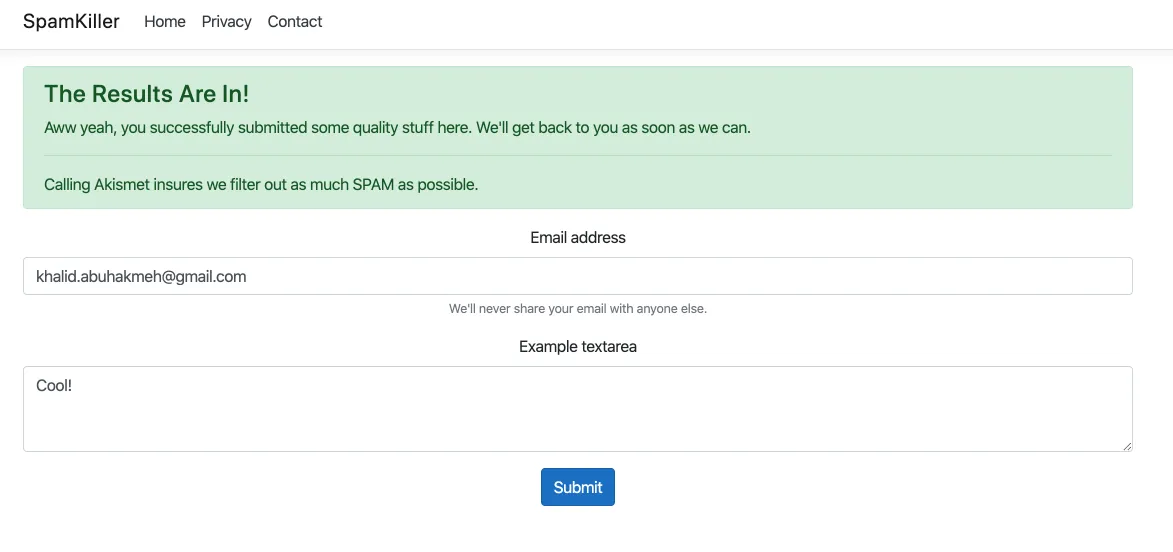
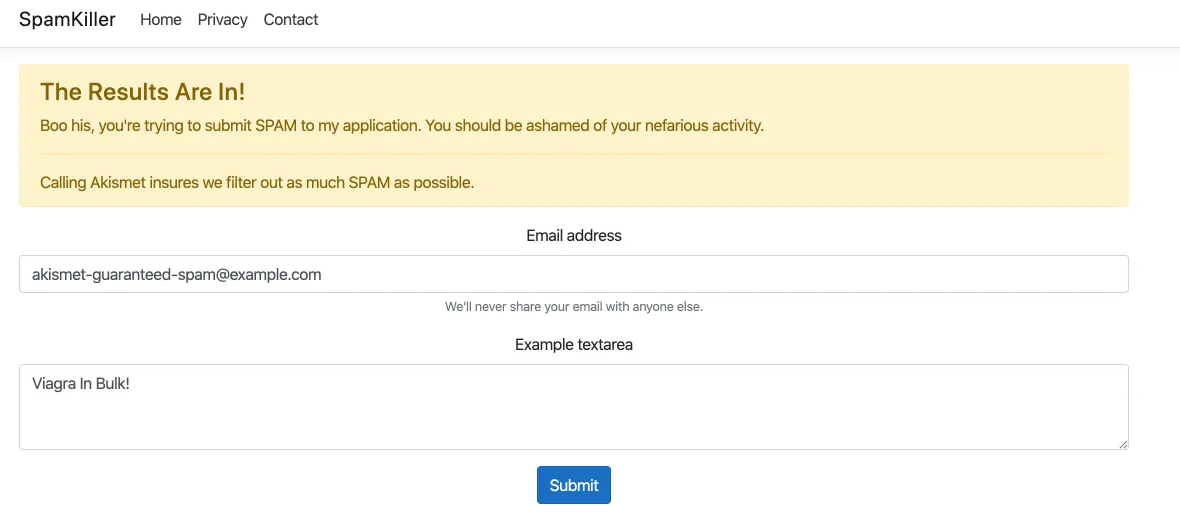
Akismet is easy to test, as they give you inputs that can trigger spam detection immediately. If the user’s email address is akismet-guaranteed-spam@example.com, it will immediately be marked as spam. Here are two examples: one is welcome, and the other marked immediately as spam.
The “good result” we expected:
The “bad” result we expected:
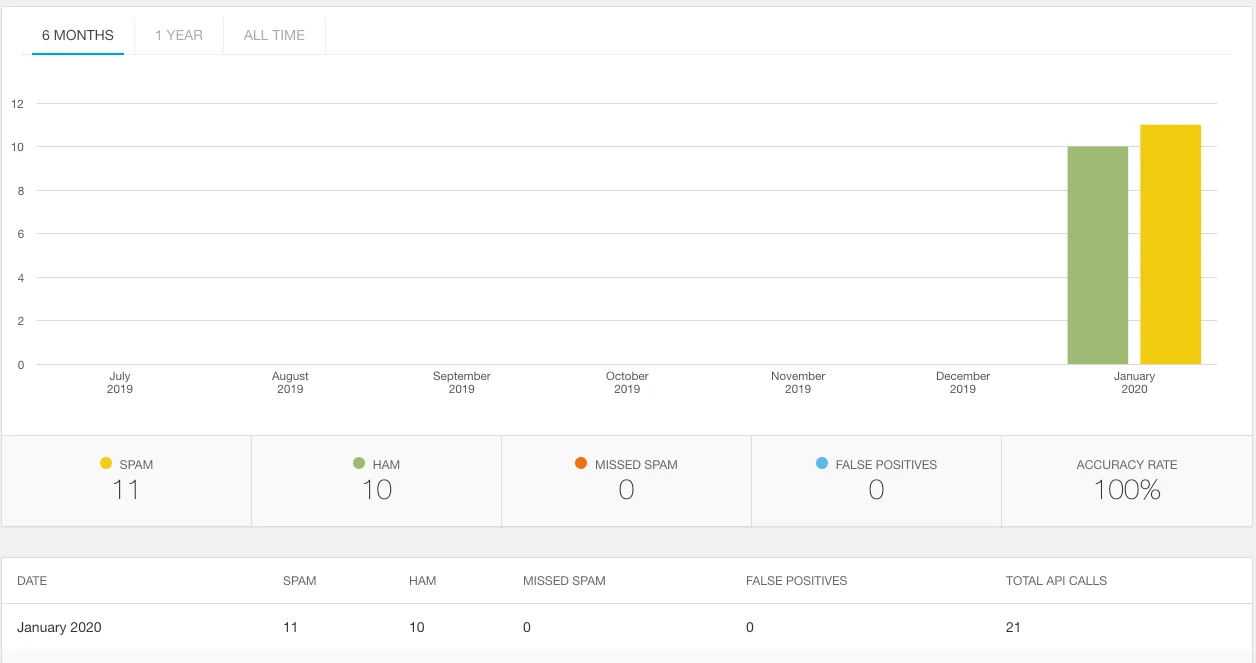
If we log into our Akismet account, it will also show us analytics around our application.
If you’d like to play around with the sample application, you can clone the repository from GitHub.
Akismet API FAQ
Is Akismet free?
Akismet is free for personal, non-commercial sites and local development. Commercial use requires a paid plan, which at the time of writing starts at about $5 a month.
Do you need WordPress to use Akismet?
No. Akismet is a standalone web API, and any application that can make HTTP requests can call it. In .NET, the Akismet NuGet package wraps the API, and you only need an API key and your site’s URL.
What are the Akismet API endpoints?
Akismet has four endpoints: key verification, comment check, submit spam, and submit ham. Comment check is the one you call on every submission, while spam and ham submissions feed corrections back to Akismet.
Conclusion
Building interactive applications are challenging, especially when the internet has nefarious parties waiting to exploit any open form. Luckily, spam isn’t a new problem, and by using Akismet, even a single developer can take on an army of spammers.
Remember the following before using Akismet:
- Akismet is free for personal use but has paid tiers for commercial use.
- The service is not perfect, so build mechanisms into your application to manage spam and ham (false-positives). Maybe a dashboard or notification system via email/text message.
- You will be transmitting the data over the internet, so take into account the latency and sensitivity of the data.
The actual implementation in code is pretty simple, and anyone can do it. I hope I’ve inspired you to battle spam and ultimately help everyone else. Good luck, and please let me know if this post has helped in any way.
Around the web
Comments
Loading comments from GitHub Discussions…