
How to Loop Through a List in C#: Every Way, Benchmarked
How to loop through and iterate a List<T> in C# with foreach, for, ForEach, Index(), and spans, plus break, continue, safe removal, and benchmarks.
 Khalid Abuhakmeh
12 min read
Khalid Abuhakmeh
12 min read

Looping through a list is one of the first things you learn in C#. A foreach loop handles most cases, but you’ll need more options once you want the index, need to remove items, or start caring about performance.
If you’re in a hurry, this is all you need.
List<string> fruits = ["apple", "banana", "cherry"];
foreach (var fruit in fruits){    Console.WriteLine(fruit);}
In this post, I’ll show you every practical way to loop through and iterate a List<T> in C#: foreach with break and continue, for, getting the index, List<T>.ForEach, looping in reverse, modifying a list while you loop, nested lists, spans, and async. Then I’ll benchmark each approach on .NET 10 and .NET 11 so you can see which loop is fastest.
Loop Through a List with foreach
Use the foreach statement by default. It has the shortest syntax, you don’t manage an index, and it works on any collection, not just List<T>.
List<string> fruits = ["apple", "banana", "cherry"];
foreach (var fruit in fruits){    Console.WriteLine(fruit);}
Keep these rules in mind:
foreachisn’t limited toIEnumerable<T>. Any type with a publicGetEnumerator()method works, which is why you canforeachover aSpan<T>.- A
nulllist throws. Looping overnullgives you aNullReferenceException. An empty list is fine; the body never runs. - The loop variable is read-only. You can’t write
fruit = "mango";inside the loop. If you need to replace items, you want aforloop.
Break and Continue in a foreach Loop
Use continue to skip the rest of the current iteration and move to the next item. Use break to exit the loop entirely.
List<string> fruits = ["apple", "banana", "cherry", "date"];
foreach (var fruit in fruits){    if (fruit == "banana")        continue; // skip to the next item
    if (fruit == "date")        break; // exit the loop
Console.WriteLine(fruit);}applecherryBoth keywords work the same way in for, while, and do loops. In nested loops, break only exits the innermost loop.
Loop Through a List with a for Loop
The for statement gives you the position of each item. Use it when you need the index or want to replace items in the list.
for (var i = 0; i < fruits.Count; i++){ Console.WriteLine($"{i}: {fruits[i]}");}0: apple1: banana2: cherryBecause you’re indexing directly, you can replace items in place.
for (var i = 0; i < fruits.Count; i++){ fruits[i] = fruits[i].ToUpperInvariant();}// APPLE, BANANA, CHERRYUse the Count property, not the LINQ Count() method. On a List<T>, they return the same number, but Count reads a stored field, while Count() is a LINQ extension method that checks the collection’s type before returning that same field. If you’re looping over an array instead, the property is Length. Everything else in this post works the same way for arrays.
Get the Index in a foreach Loop
If you like foreach but also need the index, .NET 9 added Enumerable.Index(), which pairs each item with its position as a tuple you can deconstruct.
foreach (var (index, fruit) in fruits.Index()){ Console.WriteLine($"{index}: {fruit}");}On older versions of .NET, the Select overload with an index does the same job.
foreach (var (fruit, index) in fruits.Select((f, i) => (f, i))){ Console.WriteLine($"{index}: {fruit}");}I wrote a whole post on getting a foreach with index in C#, inspired by Kotlin’s withIndex, if you want to see how to build your own version.
Loop Through a List with List.ForEach
List<T> has its own ForEach method that takes an Action<T>. Because ForEach belongs to List<T> itself, you won’t find it on IEnumerable<T> or arrays. LINQ has no ForEach method, so if you have an IEnumerable<T>, use a foreach loop.
fruits.ForEach(fruit => Console.WriteLine(fruit));
// or with a method groupfruits.ForEach(Console.WriteLine);
It’s fine for one-liners, but I rarely use it. You can’t break out of it, and it breaks with async. When you pass an async lambda to ForEach, the compiler turns it into an async void method. ForEach can’t await it, so your code moves on before the work finishes. I covered that bug in detail in .NET Tasks, List’s ForEach, and Problems. Microsoft’s docs also note that modifying the list inside the delegate “is not supported and causes undefined behavior.”
Loop Through a List in Reverse (List.Reverse vs. Enumerable.Reverse)
The most straightforward way to loop backward is a for loop that counts down.
for (var i = fruits.Count - 1; i >= 0; i--){ Console.WriteLine(fruits[i]);}You can also use LINQ’s Enumerable.Reverse, which leaves the original list alone.
foreach (var fruit in Enumerable.Reverse(fruits)){ Console.WriteLine(fruit);}Be careful with fruits.Reverse(). On a List<T>, it calls the instance method, which reverses the list in place and returns void. It won’t compile in a foreach, and if you call it on its own line, you’ve just reordered your data. Call Enumerable.Reverse(fruits) when you want a reversed sequence and an unchanged list.
If you only need the last item, use the C# 8 index operator: fruits[^1]. On .NET 11, the JIT also removes more redundant bounds checks for index-from-end access like this.
Modify a List While Looping Through It
If you remove items from a list inside a foreach loop, the code compiles and then throws an InvalidOperationException with the message “Collection was modified; enumeration operation may not execute.”
List<int> numbers = [1, 2, 3, 4, 5, 6];
foreach (var n in numbers){ if (n % 2 == 0) numbers.Remove(n); // throws on the next iteration}InvalidOperationException: Collection was modified; enumeration operation may not execute.The list’s enumerator tracks a version number, and any Add or Remove bumps it. The next call to MoveNext notices the change and throws. You can fix it three ways.
Use RemoveAll. If you’re filtering, RemoveAll does it in one call. It takes a predicate and returns how many items it removed.
var removed = numbers.RemoveAll(n => n % 2 == 0);// 3 removed: 1, 3, 5Loop backward with for. Removing an item shifts every later item down one index. When you loop from the end, the shifted items are ones you’ve already checked, so you don’t skip any.
for (var i = numbers.Count - 1; i >= 0; i--){ if (numbers[i] % 2 == 0) numbers.RemoveAt(i);}Loop over a copy. Calling ToList() copies the list, so you can add or remove items from the original without an exception. It costs an extra allocation and a full copy of the list.
foreach (var n in numbers.ToList()){ if (n % 2 == 0) numbers.Remove(n);}Changing properties on items inside a foreach is fine. When the list holds reference types, you’re changing the objects the list points to, and the list itself stays the same.
foreach (var product in products){ product.Price *= 1.1m; // totally fine}Loop Through a List of Lists (and Flatten It)
For nested lists, nest your loops.
List<List<int>> grid = [[1, 2, 3], [4, 5], [6]];
foreach (var row in grid){ foreach (var cell in row) { Console.Write($"{cell} "); } Console.WriteLine();}1 2 34 56If you don’t care about the rows and only want every item, SelectMany flattens the structure into a single sequence.
foreach (var cell in grid.SelectMany(row => row)){ Console.Write($"{cell} ");}// 1 2 3 4 5 6Loop Through a List with a Span
For hot paths, CollectionsMarshal.AsSpan gives you a Span<T> over the list’s internal array. You skip the enumerator’s version checks and loop over the array directly.
using System.Runtime.InteropServices;
foreach (var score in CollectionsMarshal.AsSpan(scores)){    Console.WriteLine(score);}
Spans also let you iterate by ref, which means you can modify items in place, including fields on structs. A regular foreach over a list can’t do that.
List<int> scores = [10, 20, 30];
foreach (ref var score in CollectionsMarshal.AsSpan(scores)){    score += 5;}// 15, 25, 35
The docs warn that items should not be added or removed from the list while the span is in use. The span has no version check. If the list grows and reallocates its array, your span keeps pointing at the old array, so reads miss new items and writes land in the old array instead of the list. You don’t get an exception. Keep this one for performance-sensitive code where you control the list.
Loop Through a List Asynchronously
There are three kinds of async loops, and they solve different problems.
If you have a list and need to await something for each item, use a plain foreach with await inside. Each iteration finishes before the next starts.
foreach (var url in urls){ var result = await FetchAsync(url); Console.WriteLine(result);}If the data arrives asynchronously, as an IAsyncEnumerable<T>, you use await foreach.
await foreach (var line in ReadLinesAsync()){ Console.WriteLine(line);}If the items don’t depend on each other and you want them processed at the same time, use Parallel.ForEachAsync. It runs your async lambda for several items at once and finishes when every item is done. Set MaxDegreeOfParallelism to limit how many run at the same time, and expect the output order to change from run to run.
await Parallel.ForEachAsync( urls, new ParallelOptions { MaxDegreeOfParallelism = 4 }, async (url, cancellationToken) => { var result = await FetchAsync(url, cancellationToken); Console.WriteLine(result); });Don’t pass an async lambda to List<T>.ForEach. You can’t await it, and your loop finishes before the work does.
Benchmark: Which C# Loop Is Fastest?
To find out whether for beats foreach, I ran each approach with BenchmarkDotNet and [MemoryDiagnoser], summing a List<int> of 10, 1,000, and 100,000 items. I ran the same benchmark class against .NET 10.0.12 and .NET 11 RC 1 on an Apple M4 Pro, using one BenchmarkDotNet job per runtime.
var config = DefaultConfig.Instance    .AddJob(Job.Default        .WithToolchain(CsProjCoreToolchain.From(new NetCoreAppSettings("net10.0", null, ".NET 10")))        .WithId(".NET 10").AsBaseline())    .AddJob(Job.Default        .WithToolchain(CsProjCoreToolchain.From(new NetCoreAppSettings("net11.0", null, ".NET 11")))        .WithId(".NET 11"));
BenchmarkRunner.Run<LoopBenchmarks>(config, args);
The project targets both frameworks with <TargetFrameworks>net10.0;net11.0</TargetFrameworks>. Here’s the benchmark class.
[MemoryDiagnoser]public class LoopBenchmarks{    private List<int> _numbers = [];
    [Params(10, 1_000, 100_000)]    public int Size { get; set; }
    [GlobalSetup]    public void Setup() => _numbers = Enumerable.Range(1, Size).ToList();
    [Benchmark(Baseline = true)]    public long For()    {        long sum = 0;        for (var i = 0; i < _numbers.Count; i++)            sum += _numbers[i];        return sum;    }
    [Benchmark]    public long Foreach()    {        long sum = 0;        foreach (var number in _numbers)            sum += number;        return sum;    }
    [Benchmark]    public long ListForEach()    {        long sum = 0;        _numbers.ForEach(number => sum += number);        return sum;    }
    [Benchmark]    public long ForeachIndex()    {        long sum = 0;        foreach (var (index, number) in _numbers.Index())            sum += number + index;        return sum;    }
    [Benchmark]    public long Span()    {        long sum = 0;        foreach (var number in CollectionsMarshal.AsSpan(_numbers))            sum += number;        return sum;    }}
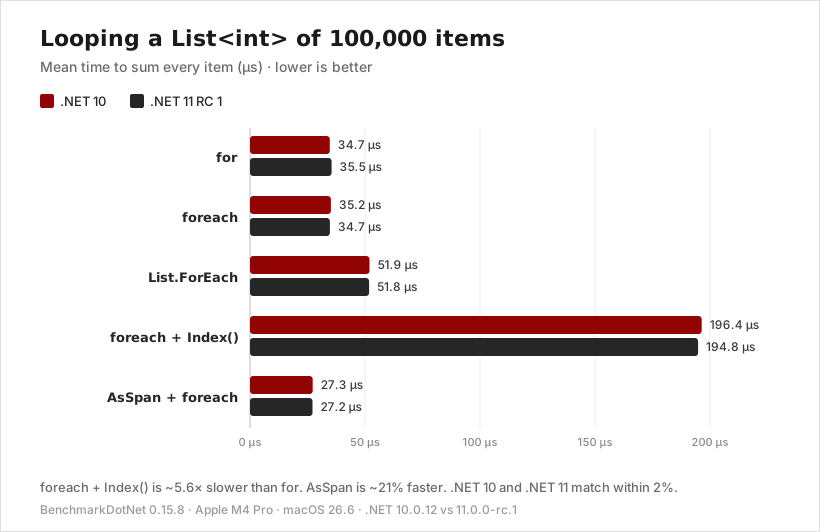
The ForeachIndex benchmark adds the index to the sum so the JIT can’t throw it away. Here are the results at 100,000 items.
And the full table across all three sizes.
| Method | Size | .NET 10 | .NET 11 RC 1 | Allocated |
|---|---|---|---|---|
| for | 10 | 2.93 ns | 4.47 ns | - |
| foreach | 10 | 3.20 ns | 6.51 ns | - |
| List.ForEach | 10 | 6.56 ns | 7.47 ns | 24 B |
| Index() | 10 | 30.75 ns | 30.52 ns | 104 B |
| AsSpan | 10 | 2.88 ns | 2.96 ns | - |
| for | 1,000 | 353.6 ns | 355.4 ns | - |
| foreach | 1,000 | 351.0 ns | 351.8 ns | - |
| List.ForEach | 1,000 | 520.3 ns | 521.4 ns | 24 B |
| Index() | 1,000 | 1,949.0 ns | 2,010.8 ns | 104 B |
| AsSpan | 1,000 | 262.8 ns | 262.5 ns | - |
| for | 100,000 | 34.70 µs | 35.49 µs | - |
| foreach | 100,000 | 35.18 µs | 34.74 µs | - |
| List.ForEach | 100,000 | 51.93 µs | 51.77 µs | 24 B |
| Index() | 100,000 | 196.39 µs | 194.84 µs | 104 B |
| AsSpan | 100,000 | 27.27 µs | 27.19 µs | - |
Here’s what I take from these numbers:
forandforeachtie. At 1,000 and 100,000 items, they finish within 2% of each other on both runtimes. The JIT optimizesforeachover aList<T>as well as it optimizes theforversion, so pick the one that’s easier to read.AsSpanis the fastest. It runs 21% to 26% faster thanforat 1,000 items and up, because it loops over the list’s backing array directly and skips the indexer’s bounds checks.List.ForEachis about 1.5× slower. Each item costs a delegate call, and because my lambda capturessum, every call allocates a 24-byte closure.Index()is about 5.6× slower and allocates 104 bytes. It goes through LINQ’s iterator instead of the list’s struct enumerator. Use it in everyday code, and avoid it in hot loops.- .NET 11 performs the same as .NET 10. At 1,000 and 100,000 items, every approach is within 4% of its .NET 10 time. At 10 items,
forandforeachmeasured a few nanoseconds slower on .NET 11 RC 1, a gap that disappears by 1,000 items, so I wouldn’t change any code over it. The .NET 11 JIT improvements that touch loops remove bounds checks for patterns likei + 1 < lengthandvalues[^1], and none of these benchmarks use those patterns.
Frequently Asked Questions
How do I iterate through a list in C#?
Use a foreach loop: foreach (var item in list) { ... }. Switch to a for loop when you need the index or want to replace items in the list.
How do I break out of a foreach loop in C#?
Use break to exit the loop immediately, or continue to skip to the next item. You can’t use either inside List<T>.ForEach, so use a foreach loop when you need them.
Which is faster in C#, a for loop or a foreach loop?
On a List<T>, they run at the same speed. In my .NET 10 and .NET 11 benchmarks, for and foreach finished within 2% of each other at 1,000 and 100,000 items. Use foreach unless you need the index, and use CollectionsMarshal.AsSpan when you need about 20% more speed in a hot path.
How do I get the index in a C# foreach loop?
On .NET 9 or later, use foreach (var (index, item) in list.Index()). On older versions, use list.Select((item, index) => (item, index)).
How do I fix “Collection was modified; enumeration operation may not execute”?
You get this InvalidOperationException when you add or remove items from a list inside a foreach loop. Use list.RemoveAll(predicate), loop backward with a for loop and call RemoveAt(i), or loop over a copy from list.ToList().
How do I loop through an array in C#?
Exactly the same way as a list. foreach works unchanged, and in a for loop you use array.Length instead of list.Count.
Bonus: Loop Around a List
Sometimes you don’t want the loop to stop at the end. Carousels, playlists, and round-robin schedulers all need to wrap back to the first item. I covered a couple of approaches using modulo math in Loop Around Index with C# Collections.
Conclusion
Use this list to pick a loop:
foreachfor reading every item. It’s the default.forwhen you need the index or need to replace items.Index()when you wantforeachreadability and the index (.NET 9+).RemoveAllor a backwardforloop when removing items.CollectionsMarshal.AsSpanfor hot paths where you control the list.await foreachforIAsyncEnumerable<T>,Parallel.ForEachAsyncfor concurrent work, and neverasynclambdas insideList<T>.ForEach.
As always, thanks for reading, and be sure to share this post with colleagues who are still fighting InvalidOperationException. Cheers.
Around the web
Comments
Loading comments from GitHub Discussions…