
ASP.NET Core Middleware: Register and Order It With Attributes
ASP.NET Core middleware explained, plus a reusable attribute-based pattern to register and order middleware in Program.cs without a wall of app.Use calls.

ASP.NET Core middleware is code that sits in the request pipeline and can inspect or modify the request and response before and after calling the next piece of middleware. You register it in order in Program.cs with calls like app.UseMiddleware<T>(), and that registration order is the order it runs in. Below I show an attribute-based pattern for registering a pile of middleware without a long list of app.Use... calls.
Updated October 2026: I modernized this post for current .NET. The original used a
Startupclass withConfigureServicesandConfigure, which new ASP.NET Core templates no longer generate. The examples below now use the minimal hosting model inProgram.cs. The middleware and registration code itself didn’t need to change.
One of my favorite features of modern web development is Middleware. Middleware is a powerful abstraction that can encapsulate your intent, enrich an incoming request, enhance an outgoing response, or do all the above. Once you embrace Middleware as a potential approach to solving problems, it becomes second nature to think in that paradigm.
What I don’t love about Middleware is the need to register each unique Middleware in an ASP.NET Core application’s Program.cs regularly. The wall of registrations can feel messy, which can lead to readability issues, and ultimately bugs.
In this post, I’ll show you code I’ve been experimenting with to reduce the noise in my Program.cs, while still utilizing Middleware as a powerful tool for my web applications. I’ll also talk about the tradeoffs of using this method as opposed to manually registering Middleware.
What Is Middleware
I’ll try and explain what Middleware is if you’re new to ASP.NET Core, or web development in general. Web applications operate on the premise of request and response. A client asks the app to perform some action, and in return, the server acknowledges and responds to the request.
Imagine that a web application is an assembly line for building cars. First, a customer orders a car. When the order comes in, the factory begins processing the request and gets all employees in the order required to build the vehicle. In this analogy, each different step in the assembly line would alter, modify, and enhance the car before it was complete. By the end of the process, we will have produced a fully functional vehicle.
Each Middleware is a step in the assembly line of fulfilling a client’s request.
In ASP.NET Core, we have a specific IMiddleware interface that implementations can implement. While not wholly required to work, it is prefered in my example, since we’ll be using it to find Middleware in our project.
using System.Threading.Tasks;
namespace Microsoft.AspNetCore.Http{  public interface IMiddleware  {    Task InvokeAsync(HttpContext context, RequestDelegate next);  }}
Keeping with the analogy of an assembly line, the order of our workers is critical to the outcome. It is essential to have all Middleware registered in the order they need to modify the request and response. The incorrect order could dramatically change the result.
Another significant part of Middleware in ASP.NET Core is you can create them via a Middleware Factory. Factory creation means Middleware can take dependencies like database connections, HTTP clients, and logging mechanisms. The way to opt into factory creation is to register our Middleware with the ServiceCollection in ASP.NET Core.
So what did we learn about Middleware?
- Each Middleware has an opportunity to modify the request or response.
- Middleware ordering matters.
- We can create Middleware via a Middleware Factory if we register our Middleware type into the
ServiceCollectioninProgram.cs.
Registration
If you want to follow along with the code below, you can download the sample from my GitHub repository.
The sample was originally written for .NET Core 3.0. The snippets in this post target the minimal hosting model used by current .NET (6 and later), and the extension methods work unchanged.
In Program.cs
Registering and ordering our Middleware is the most critical steps we need to achieve. Let’s take a look at what Program.cs looks like in our ASP.NET Core application. Note, these are custom extensions and the code will be below.
This first bit of code scans our application for any type implementing IMiddleware, and that has a custom attribute of MiddlewareAttribute. We will register Middleware by the scope specified on the attribute: Scoped, Transient, or Singleton.
var builder = WebApplication.CreateBuilder(args);
builder.Services.AddRazorPages();// finds and registers every middleware// decorated with MiddlewareAttributebuilder.Services.AddMiddlewares<Program>();
The second part of our code registers our Middleware in the order we specify in the MiddlewareAttribute.
var app = builder.Build();
if (!app.Environment.IsDevelopment()){    app.UseExceptionHandler("/Error");    // The default HSTS value is 30 days. You may want to change this for production scenarios, see https://aka.ms/aspnetcore-hsts.    app.UseHsts();}
app.UseHttpsRedirection();app.UseStaticFiles();app.UseRouting();app.UseAuthorization();
// will order middlewares based// on attributes on the middleware classesapp.UseMiddlewares<Program>();
app.MapRazorPages();
app.Run();
Note: Since this is an extension method, it can only register Middlewares between the already registered Middlewares.
For example, our registered Middlewares will all come after the Routing Middleware. On current .NET, WebApplication adds routing and endpoint middleware for you automatically, but calling UseRouting() explicitly, as above, lets you control where your middleware sits relative to it.
Our Middlewares
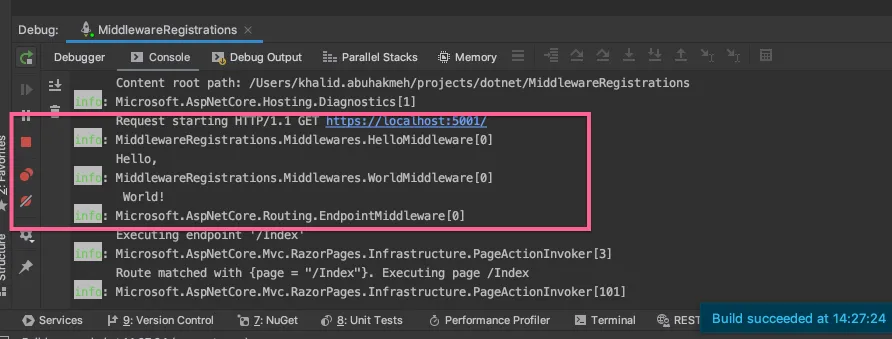
The Middleware we implement will be very simple. In this example, we will have a HelloMiddleware and a WorldMiddleware. Each will take a dependency and write to the log output.
[Middleware(Order = 1)]public class HelloMiddleware : IMiddleware{    private readonly ILogger<HelloMiddleware> logger;
    public HelloMiddleware(ILogger<HelloMiddleware> logger)    {        this.logger = logger;    }
    public async Task InvokeAsync(HttpContext context, RequestDelegate next)    {        logger.LogInformation("Hello, ");        await next(context);    }}
And the second Middleware is no different.
[Middleware(Order = 2)]public class WorldMiddleware : IMiddleware{    private readonly ILogger<WorldMiddleware> logger;
    public WorldMiddleware(ILogger<WorldMiddleware> logger)    {        this.logger = logger;    }
    public async Task InvokeAsync(HttpContext context, RequestDelegate next)    {        logger.LogInformation(" World!");        await next(context);    }}
When we run our application, we see the results of our Middleware execution.
The Code
The code that makes this all work is straightforward. We decorate our Middleware with attributes and implement IMiddleware on our objects. We then scan an assembly to find those specific types. Below is the code you’ll need to get the results I showed above, starting with a custom attribute.
[AttributeUsage(AttributeTargets.Class)]public class MiddlewareAttribute : Attribute{    public int Order { get; set; } = int.MaxValue;    public MiddlewareScope Scope { get; set; } = MiddlewareScope.Scoped;}
public interface IMiddlewareInformation{    int Order { get; }    MiddlewareScope Scope { get; }
    Type Type { get; }}
public class MiddlewareInformation : IMiddlewareInformation{    public MiddlewareInformation(MiddlewareAttribute attribute, Type type)    {        Order = attribute.Order;        Type = type;        Scope = attribute.Scope;    }
    public int Order { get; set; }    public MiddlewareScope Scope { get; set; }    public Type Type { get; set; }}
public enum MiddlewareScope{    /// <summary>    /// Scoped to the current request    /// </summary>    Scoped = 0,    /// <summary>    /// The middleware will be created    /// every time it is required    /// </summary>    Transient = 1,    /// <summary>    /// singleton middleware should be used    /// carefully, as it can capture dependencies    /// that should be transient or scoped    /// </summary>    Singleton = 2}
The heart of this implementation is in the extensions that hang from IApplicationBuilder and IServiceCollection.
public static class MiddlewareRegistrationExtensions{    public static IServiceCollection AddMiddlewares<T>(this IServiceCollection serviceCollection)    {        return AddMiddlewares(serviceCollection, typeof(T).Assembly);    }
    public static IServiceCollection AddMiddlewares(this IServiceCollection serviceCollection, Assembly assembly)    {        var middlewares = MiddlewareInformationsFromAssembly(assembly);        foreach (var mw in middlewares)            switch (mw.Scope)            {                case MiddlewareScope.Singleton:                    serviceCollection.AddSingleton(mw.Type);                    break;                case MiddlewareScope.Transient:                    serviceCollection.AddTransient(mw.Type);                    break;                default:                    serviceCollection.AddScoped(mw.Type);                    break;            }
        return serviceCollection;    }
    public static IApplicationBuilder UseMiddlewares<T>(this IApplicationBuilder applicationBuilder)    {        return UseMiddlewares(applicationBuilder, typeof(T).Assembly);    }
    public static IApplicationBuilder UseMiddlewares(this IApplicationBuilder applicationBuilder, Assembly assembly)    {        var middlewares = MiddlewareInformationsFromAssembly(assembly);
        foreach (var mw in middlewares) applicationBuilder.UseMiddleware(mw.Type);
        return applicationBuilder;    }
    private static List<IMiddlewareInformation> MiddlewareInformationsFromAssembly(Assembly assembly)    {        IMiddlewareInformation GetMiddlewareInformation(Type type)        {            var attribute = type.GetCustomAttribute<MiddlewareAttribute>();
            if (typeof(IMiddleware).IsAssignableFrom(type))            {                if (attribute != null)                {                    return new MiddlewareInformation(attribute, type);                }            }
            if (typeof(IMiddlewareInformation).IsAssignableFrom(type))            {                var instance = Activator.CreateInstance(type) as IMiddlewareInformation;                return instance;            }
            return null;        }
        var types = new[]        {            typeof(IMiddlwareRegistrar),            typeof(IMiddleware)        };
        var middlewares = assembly            .GetTypes()            .Where(x => !x.IsAbstract)            .Where(type => types.Any(t => t.IsAssignableFrom(type)))            .Select(GetMiddlewareInformation)            .Where(x => x != null)            .OrderBy(x => x.Order)            .ToList();
        return middlewares;    }}
So You Hate Attributes
I know attributes have a bit of a mixed reception in the .NET space. Some folks love them, others can’t stand them. The implementation in this post also allows for a MiddlewareRegistrar<T> class. Any implementation of the base class will also be scanned for and registered.
public abstract class MiddlewareRegistrar<T> : IMiddlwareRegistrar{    public Type Type => typeof(T);    public int Order { get; set; } = int.MaxValue;    public MiddlewareScope Scope { get; set; } = MiddlewareScope.Scoped;}
public interface IMiddlwareRegistrar : IMiddlewareInformation{}
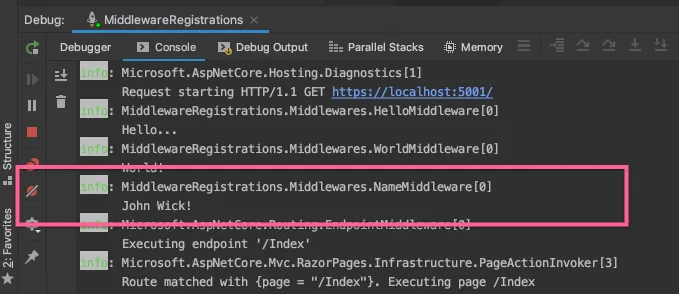
This NameMiddlware does not use the attribute, but instead uses the registrar approach.
public class NameMiddleware : IMiddleware{    public class NameRegistrar : MiddlewareRegistrar<NameMiddleware>    {        public NameRegistrar()        {            Order = 3;        }    }
    private readonly ILogger<NameMiddleware> logger;
    public NameMiddleware(ILogger<NameMiddleware> logger)    {        this.logger = logger;    }
    public async Task InvokeAsync(HttpContext context, RequestDelegate next)    {        logger.LogInformation("John Wick!");        await next(context);    }}
Here is the output using the registrar.
Trade Offs
With every solution comes trade offs, and this particular code is no different. A few drawbacks I can think of with this solution include but may not be limited to:
Spelunking For Order
While the MiddlwareAttribute allows you to set an ordered integer, it requires you to manage values across multiple files in a solution. The sprawl can mean you spend more time trying to visualize the order rather than just looking in Program.cs.
Splitting Registration
Additionally, you may want your Middleware registrations to wrap an already registered component of ASP.NET Core. What if you wanted some of your Middleware to be registered before routing, and some after another Middleware? This approach could be altered to add categorical registration, but currently doesn’t.
Assembly Scanning
Scanning assemblies and finding types can be relatively expensive. It might be a cost you are not willing to pay for, especially if your application needs to restart consistently.
Conclusion
The approach outlined in this post can help reduce the noise in most ASP.NET Core web applications. It is sturdy and utilizes ASP.NET Core constructs for registration and building Middleware. While I mentioned trade-offs for this approach, I think they are minor performance costs in favor of a more readable codebase. This approach can be modified to add categorical registration so that Middleware can be registered in groups and thus solve the splitting problem mentioned above.
What do you think? Do you see yourself adopting a similar approach to keep your Program.cs lean? I’d love to hear what you think. Feel free to download the code sample at my GitHub repository.
Around the web
Comments
Loading comments from GitHub Discussions…