
Read and Write Excel Files in C#: How to Write to Excel (.xlsx)
Read and write Excel files in C#: write a List<T> to .xlsx with formatting and formulas, return Excel from ASP.NET Core, and read rows into objects.

Microsoft Excel is the undisputed champion of the business world, powering every industry and informing decision-makers at the highest echelons of corporate structures. As a developer, it is not a matter of if we’ll have to deal with Excel spreadsheets, but a matter of when. Fret not! This post covers the most straightforward ways I’ve found to read and write Excel file in C#, using nothing but NuGet packages and no Microsoft Office install required.
If your data is already in C# objects, the quickest way to write it to an .xlsx file is the ExcelMapper NuGet package:
dotnet add package ExcelMapperusing Ganss.Excel;
var movies = new List<Movie>{ new(1, "Dune: Part Two", "max"), new(2, "Oppenheimer", "peacock")};
await new ExcelMapper().SaveAsync("Movies.xlsx", movies, sheetName: "Movies");
public record Movie(int Id, string Name, string StreamingService);That creates Movies.xlsx with a header row (Id, Name, StreamingService) and one row per movie. It runs on Windows, macOS, and Linux, and you don’t need Microsoft Office installed.
Reading the file back into objects is one more line:
var moviesFromExcel = await new ExcelMapper().FetchAsync<Movie>("Movies.xlsx");When you need control over individual cells, such as bold headers, formulas, or column widths, use ClosedXML instead. I’ll show both.
Which C# Library Should I Use to Read and Write Excel Files?
| Library | Best for |
|---|---|
| ExcelMapper | Writing a List<T> to a sheet and reading rows back into objects with minimal code; built on NPOI. Free and OSS. |
| ClosedXML | Writing cell by cell with a friendly API: formatting, formulas, tables, column widths. Free and OSS. |
| NPOI | Lower-level control, plus the older .xls format. Free and OSS. |
| EPPlus | Feature-rich formatting and formula support, but commercial licensing since version 5. |
| ExcelDataReader | Fast, forward-only reading of .xlsx and .xls files. It can’t write them. Free and OSS. |
If you just need to dump data into a spreadsheet, start with ExcelMapper. If the spreadsheet needs to look a certain way, use ClosedXML.
Write a List to Excel with ExcelMapper
ExcelMapper is an MIT-licensed library that reads and writes Excel files using “Plain old C# objects (POCOs)”. It’s built on the managed NPOI library, so it works cross-platform without Office or COM interop. Those familiar with data access libraries like Entity Framework Core or Dapper will feel right at home. It works with classes, records, and dynamic objects.
The example at the top of this post is the whole workflow: build a List<T>, call SaveAsync, done. ExcelMapper uses your property names as column headers.
Add a Sheet to an Existing Excel File
A fresh new ExcelMapper() starts with an empty workbook, so calling SaveAsync on an existing file replaces the whole file and wipes out any other sheets. To add a sheet and keep what’s already there, load the file first, either by passing the path to the constructor or by calling FetchAsync.
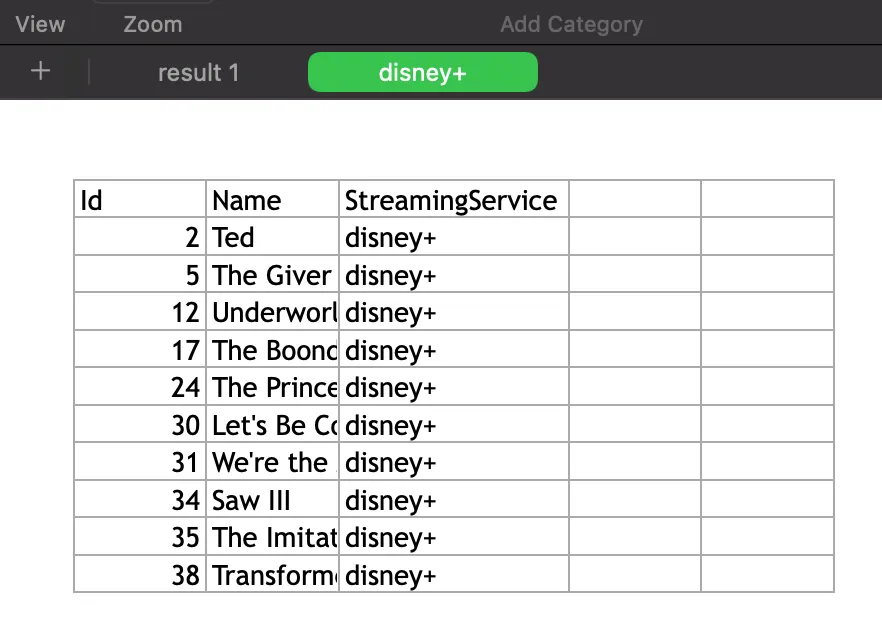
Let’s say Movies.xlsx has a sheet of movies. We’ll read them, change the StreamingService column, and write the result to a new sheet labeled disney+. Since we’re using C# records, we’ll use the with keyword to create modified copies.
using Ganss.Excel;
const string excelFile = "Movies.xlsx";var excel = new ExcelMapper();var movies = (await excel.FetchAsync<Movie>(excelFile)).ToList();var purchasedByDisney = new List<Movie>();const string disney = "disney+";foreach (var movie in movies){    Console.WriteLine(movie);    purchasedByDisney.Add(movie with    {        StreamingService = disney    });}
await excel.SaveAsync(    excelFile,    purchasedByDisney,    sheetName: disney);
public record Movie(    int Id,    string Name,    string StreamingService);
Because FetchAsync loaded the workbook, the original sheet survives, and we get a new sheet labeled disney+ in our favorite spreadsheet viewer.
Wow, it doesn’t get any easier than that!
Write to Excel Cells with ClosedXML
ExcelMapper decides the layout for you. When you want to decide it yourself, ClosedXML lets you write values cell by cell and style them as you go.
dotnet add package ClosedXMLusing ClosedXML.Excel;
var movies = new List<Movie>{ new(1, "Dune: Part Two", "max"), new(2, "Oppenheimer", "peacock")};
using var workbook = new XLWorkbook();var sheet = workbook.Worksheets.Add("Movies");
// header rowsheet.Cell("A1").Value = "Id";sheet.Cell("B1").Value = "Name";sheet.Cell("C1").Value = "Streaming Service";sheet.Row(1).Style.Font.Bold = true;
// data rows, using (row, column) coordinatesvar row = 2;foreach (var movie in movies){ sheet.Cell(row, 1).Value = movie.Id; sheet.Cell(row, 2).Value = movie.Name; sheet.Cell(row, 3).Value = movie.StreamingService; row++;}
// a formula below the datasheet.Cell(row, 2).FormulaA1 = $"COUNTA(B2:B{row - 1})";
sheet.Columns().AdjustToContents();workbook.SaveAs("Movies.xlsx");
public record Movie(int Id, string Name, string StreamingService);You can address cells by A1 notation ("B1") or by (row, column) numbers, which is handier inside loops. Both start at 1, not 0. AdjustToContents sizes each column to fit its contents, so nobody has to double-click column borders.
Write a List as an Excel Table
If you want a real Excel table, with filter buttons and banded rows, ClosedXML can build one from a collection in one call:
using var workbook = new XLWorkbook();var sheet = workbook.Worksheets.Add("Movies");
sheet.Cell("A1").InsertTable(movies);sheet.Columns().AdjustToContents();
workbook.SaveAs("Movies.xlsx");
Append Rows to an Existing Excel File
To add data to a workbook that already exists, open it, find the last used row, and write below it. Save() writes back to the same file.
using var workbook = new XLWorkbook("Movies.xlsx");var sheet = workbook.Worksheet("Movies");
var next = sheet.LastRowUsed()!.RowNumber() + 1;sheet.Cell(next, 1).Value = 3;sheet.Cell(next, 2).Value = "Barbie";sheet.Cell(next, 3).Value = "max";
workbook.Save();
Return an Excel File from ASP.NET Core
A common reason to write Excel files is an “Export to Excel” button. You don’t need a file on disk for that. Save the workbook to a MemoryStream and return the bytes with the .xlsx content type.
using ClosedXML.Excel;
var builder = WebApplication.CreateBuilder(args);var app = builder.Build();
app.MapGet("/movies.xlsx", () =>{    var movies = new List<Movie>    {        new(1, "Dune: Part Two", "max"),        new(2, "Oppenheimer", "peacock")    };
    using var workbook = new XLWorkbook();    workbook.Worksheets.Add("Movies").Cell("A1").InsertTable(movies);
    using var stream = new MemoryStream();    workbook.SaveAs(stream);
    return Results.File(        stream.ToArray(),        "application/vnd.openxmlformats-officedocument.spreadsheetml.sheet",        "movies.xlsx");});
app.Run();
public record Movie(int Id, string Name, string StreamingService);
ExcelMapper can do the same thing, since SaveAsync also accepts a Stream.
What About Microsoft.Office.Interop.Excel?
Older answers you’ll find online use Microsoft.Office.Interop.Excel. It automates a real copy of Excel through COM, so it only works on Windows with Office installed, and Microsoft advises against automating Office on servers. Unless you need to drive the Excel application itself, the libraries above are a better fit. They write the .xlsx file directly and run anywhere .NET does.
How to Read an Excel File in C#
Reading is the mirror image of writing with ExcelMapper. Let’s say we have an Excel file with movie data and a header row with Id, Name, and StreamingService. ExcelMapper maps columns to properties by name, so we only need a record that matches those headers.
public record Movie( int Id, string Name, string StreamingService);Create an instance of ExcelMapper and call FetchAsync with our record type.
const string excelFile = "Movies.xlsx";var excel = new ExcelMapper();var movies = (await excel.FetchAsync<Movie>(excelFile)).ToList();
foreach (var movie in movies){    Console.WriteLine(movie);}
Running our application, we can see the results in our console output.
Movie { Id = 2, Name = Ted, StreamingService = netflix }Movie { Id = 5, Name = The Giver, StreamingService = netflix }Movie { Id = 12, Name = Underworld: Awakening, StreamingService = netflix }Movie { Id = 17, Name = The Boondock Saints, StreamingService = netflix }Movie { Id = 24, Name = The Princess and the Frog, StreamingService = netflix }Movie { Id = 30, Name = Let's Be Cops, StreamingService = netflix }Movie { Id = 31, Name = We're the Millers, StreamingService = netflix }Movie { Id = 34, Name = Saw III, StreamingService = netflix }Movie { Id = 35, Name = The Imitation Game, StreamingService = netflix }Movie { Id = 38, Name = Transformers: Age of Extinction, StreamingService = netflix }FAQ
How do I write to an Excel file in C#?
Put your data in a List<T>, then call await new ExcelMapper().SaveAsync("file.xlsx", data) from the ExcelMapper package. For control over individual cells, formatting, or formulas, use ClosedXML’s XLWorkbook, set values with sheet.Cell(row, column).Value, and call SaveAs.
How do I write to an existing Excel file without overwriting it?
Load the workbook before saving. With ExcelMapper, call FetchAsync or pass the file path to the ExcelMapper constructor, then SaveAsync with a new sheetName. With ClosedXML, open the file with new XLWorkbook(path), write your cells, and call Save().
How do I read an Excel file in C#?
Create a class or record whose property names match the header row, then call await new ExcelMapper().FetchAsync<T>("file.xlsx"). You get back one object per row. If you only need fast, read-only access to raw cell values, ExcelDataReader is another option.
Can ExcelDataReader write Excel files?
No. ExcelDataReader only reads .xlsx and .xls files. To write Excel files, use ExcelMapper, ClosedXML, NPOI, or EPPlus. You can keep ExcelDataReader for reading and add one of those for writing.
Can I write Excel files without Microsoft Office installed?
Yes. ExcelMapper, ClosedXML, and NPOI are pure managed .NET code. They write .xlsx files on Windows, macOS, and Linux without Excel, Office, or COM interop.
What’s the best C# library to write Excel files?
For dumping objects into a sheet, ExcelMapper needs the least code. For formatted reports with formulas and styling, ClosedXML is free and pleasant to use. EPPlus is also capable but requires a commercial license since version 5.
How do I write data to Excel in C#?
Put the data in a List<T> and call await new ExcelMapper().SaveAsync("file.xlsx", data), or use ClosedXML’s XLWorkbook and set values with sheet.Cell(row, column).Value when you need to control individual cells or formatting.
How do I open an Excel file and write to it in C#?
Open the existing workbook first instead of starting from a blank one. With ClosedXML, use new XLWorkbook("Movies.xlsx"), find the last used row with LastRowUsed(), write your new cell values, and call Save(). With ExcelMapper, call FetchAsync (or pass the file path to the constructor) before SaveAsync so the existing sheets aren’t wiped out.
How do I create an Excel sheet in C#?
Create a new workbook with new XLWorkbook() and add a sheet with workbook.Worksheets.Add("SheetName"), or let ExcelMapper create the workbook and sheet for you by calling SaveAsync with a sheetName argument.
Whichever library you pick, a few lines of C# will keep the business folks in our lives that much happier.
If you’re exporting data in other formats, check out my posts on converting C# objects to CSV and other formats, reading files in C#, and templating Microsoft Word documents with MiniWord.
Thanks for reading, and please leave a comment below. Also, follow me on Mastodon at @khalidabuhakmeh to get the latest .NET news and tutorials.
Around the web
Comments
Loading comments from GitHub Discussions…