
Start PowerShell Faster With This One Trick
Learn to increase the startup performance of a PowerShell command-line instance. Get hours of your life back and run more scripts while you're at it.
 Khalid Abuhakmeh
1 min read
Khalid Abuhakmeh
1 min read
Written in 2019. APIs and package versions may have moved on since, so check the code against the .NET version you're targeting.
The title of this post is very tongue in cheek and a bit of a jab at click-bait posts, but I genuinely have a “trick” that will make starting up PowerShell faster and give you hours back throughout your development career.
You may be familiar with the Microsoft copyright presented on every new PowerShell session.
PowerShell 6.2.3Copyright (c) Microsoft Corporation. All rights reserved.
https://aka.ms/pscore6-docsType 'help' to get help.
It’s great that Microsoft built PowerShell, but being reminded of it with every session is a bit obnoxious. You can tell PowerShell not to display the copyright, and it should start your session up considerably faster.
> powershell.exe -nologoThe -nologo flag also works for those running PowerShell Core on macOS.
> pwsh -nologoHere is a screenshot before adding the -nologo flag.
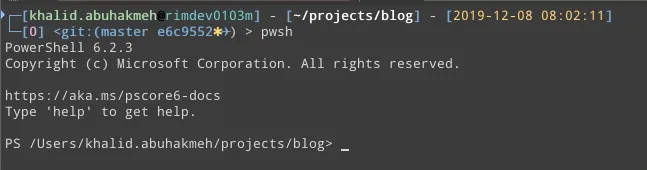
And here it is after.

If you are running a console emulator, make sure you update the configuration with the -nologo flag. I hope you find this helpful and get back a few more seconds of productivity.
Around the web
Comments
Loading comments from GitHub Discussions…