
Power Up Jekyll With Thor Commands
As a Jekyll blogger, use Ruby and Thor commands to supercharge your blogging experience. Add commands that help queue up posts for a schedule and more.
 Khalid Abuhakmeh
3 min read
Khalid Abuhakmeh
3 min read
Written in 2020. APIs and package versions may have moved on since, so check the code against the .NET version you're targeting.
My static site generator of choice remains the Jekyll, although there are many great alternatives. This very blog uses Jekyll as its static site generator.
In my time with Jekyll, I’ve learned a few tricks which have increased my writing efficiency. In this post, I’ll show you a Thor script I use to generate scheduled blog posts. This approach will work for other static site generators, but it utilizes Ruby as its already a dependency of Jekyll. Feel free to adapt it to your needs.
What Is Thor
Thor is a Ruby gem that allows developers to build command-line tools effectively.
Thor is a simple and efficient tool for building self-documenting command-line utilities. It removes the pain of parsing command-line options… –Thor
To get started using Thor, you will need to install the gem. There are two methods to doing so. The first is to install the gem globally.
gem install thorWe can also add Thor to our GEMFILE.
gem 'thor'Once we have Thor installed, we can invoke it via the command-line.
thor jekyll:new something interesting to write aboutWe’ll see how the command works a little later, but the breakdown is straightforward.
thoris the ruby gemjekyllis the name of ourClassthat has commandsnewis the command within our class- the rest of the text is the title of our blog post
Thor Power For Jekyll
I have two Thor commands I can use when publishing new posts: new and next. The new command creates a new file template based on today’s date. The next command picks the next Tuesday or Thursday based on the published date of the latest post. Let’s see how they work in the command line.

And now the next command.
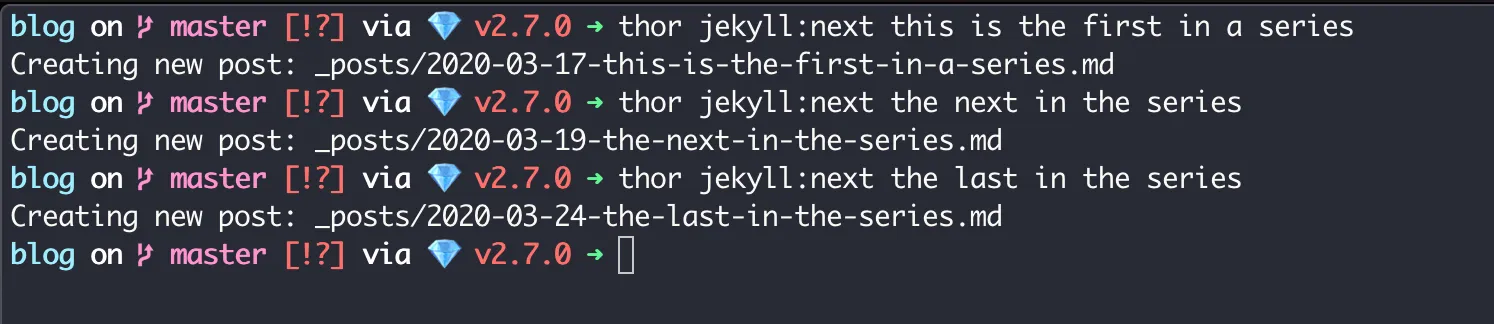
Notice how the next command, keeps incrementing the post dates. This is awesome for blogging on a set schedule.
Thor Commands
To use these commands, create a file at the root of your Jekyll directory named jekyll.thor. You may change the template by modifying the contents of the create_file method. Here is my file in its entirety.
require "stringex"require "date"
class Jekyll < Thor desc "new", "create a new post" method_option :editor, :default => "code" def new(*title) title = title.join(" ") date = Time.now.strftime('%Y-%m-%d')
create_file(date, title) end
desc "next", "create the next post (tuesday & thursday)" method_option :editor, :default => "code" def next(*title) title = title.join(" ")
# We want the day after the latest post # to exclude it from the process latest = (Date.parse Dir["_posts/*.md"].sort.last[7..16]) + 1; # get next Tuesday and next Thursday dates = [get_next_day(latest, 2), get_next_day(latest, 4)] date = dates.min.strftime('%Y-%m-%d')
create_file(date, title) end
private
def create_file(date, title) filename = "_posts/#{date}-#{title.to_url}.md"
if File.exist?(filename) abort("#{filename} already exists!") end
puts "Creating new post: #{filename}" open(filename, 'w') do |post| post.puts "---" post.puts "layout: post" post.puts "title: \"#{title.gsub(/&/,'&')}\"" post.puts "tags:" post.puts "image: " post.puts "image_credit_name: " post.puts "image_credit_url: " post.puts "image_alt: " post.puts "---" end
system(options[:editor], '.') end
def get_next_day(date, day_of_week) date + ((day_of_week - date.wday) % 7) end
endNote, you will need to have the gems stringex and thor added to your GEMFile.
Conclusion
By creating a robust blogging infrastructure, you can spend more time writing and less time fiddling with your platform. Thor is a great mechanism to build an efficient local environment. I hope you’ve learned something new, and let me know if you think of other Thor commands that enable your blogging experience. For Asgard!
 {: style=“width:100%” }
Around the web
Comments
Loading comments from GitHub Discussions…